
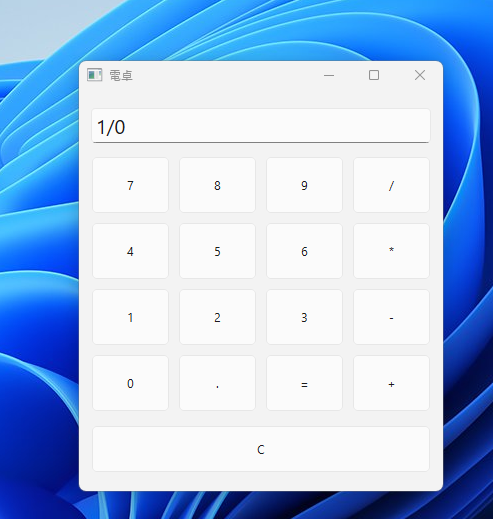
- GUIはTinker以外にも沢山ある、とりあえずPyside6を勉強する
- やっぱり最初は電卓。AIが30秒足らずで作った
関連内部ページ:ミニマムGUI(pyside6)、
#コマンドライン引数 このコードでは使わないが慣習として書くらしい
import sys

#from モジュール名 import \モジュール名を省略できるため、短く書ける。
from PySide6.QtWidgets import (
    QApplication,
    QWidget,
   QVBoxLayout,
    QGridLayout,
    QPushButton,
    QLineEdit,
)

#継承してる オブジェクト指向よくわからない
class Calculator(QWidget):
    #selfもよくわからない
    #__init__() \初期化メソッド 初めから無いと困る要素を書く
    def __init__(self):
        #継承した親クラスをinitする
        super().__init__()

        self.setWindowTitle("電卓")
        self.resize(300, 400)

        #縦(V)方向に自動で配置する
        layout = QVBoxLayout()

        #self. /クラス内の他メソッドでも使えるようにしてる
        #publicは他クラスにも公開される
        #メソッドの後ろには引数なくても()がつく
        self.display = QLineEdit()
        self.display.setReadOnly(True)

        self.display.setStyleSheet("font-size:20px;")
        layout.addWidget(self.display)

        grid = QGridLayout()

        #リストを作ってる
        buttons = [
            "7", "8", "9", "/",
            "4", "5", "6", "*",
            "1", "2", "3", "-",
            "0", ".", "=", "+"
        ]

        row = 0
        col = 0

        for text in buttons:
            button = QPushButton(text)
            button.setMinimumHeight(60)

            if text == "=":
                button.clicked.connect(self.calculate)
            else:
                button.clicked.connect(
                    lambda checked=False, t=text: self.display.insert(t)
                )

            grid.addWidget(button, row, col)

            col += 1
            if col == 4:
                col = 0
                row += 1

        layout.addLayout(grid)

        clear_button = QPushButton("C")
        clear_button.setMinimumHeight(50)
        clear_button.clicked.connect(self.display.clear)

        layout.addWidget(clear_button)

        self.setLayout(layout)

    def calculate(self):
        try:
            result = str(eval(self.display.text()))
            self.display.setText(result)
        except Exception:
            self.display.setText("Error")

app = QApplication(sys.argv)

window = Calculator()
window.show()

app.exec()
コメント